As compact ROVs and uncrewed surface vessels have become more accessible, those needs have reached a wider group of users. An inspection or survey platform may carry imaging and positioning hardware, navigation sensors and an onboard computer. Each component can do its job well while leaving the operator to connect the pieces. Time intended for work on the water can disappear into network settings, separate applications, unfamiliar file formats, and equipment-specific routines.
Simplifying Sonar Use
Cerulean Sonar heard that concern from customers and the market. Operators wanted capable sonar tools without having to become specialists in every network and data connection aboard their vehicles. They wanted software that could move between missions and platforms instead of tying a project to one machine. SonarView was developed in response: a user-friendly application designed to make sonar easier to connect, view, control, record, and revisit.

SonarView is free to download and runs on Windows, macOS, Linux, and Docker and supports Cerulean’s family of products. That breadth matters to teams whose equipment changes with the assignment. A familiar starting point can reduce the need to learn a different application each time a vehicle changes.
The first challenge often appears before the mission starts: finding the sonar on the network. SonarView’s device discovery can locate equipment even when a device’s address is outside the computer’s network range. The discovery screen shows the conflict and, for supported devices, lets the operator update the IP address there. Once connected, SonarView opens the controls and display created for that instrument.
More involved operations can be saved as sessions. Users can bring together sonar devices, a vehicle, position, and heading sources in one configuration and can also integrate with many platforms and ecosystems.
Consider a team inspecting a mooring, searching for a lost object or examining an unexpected shape in the water column. The useful question is rarely just, “Is something there?” The team also needs to know its size, location, and relationship to the surrounding area and mission intent.
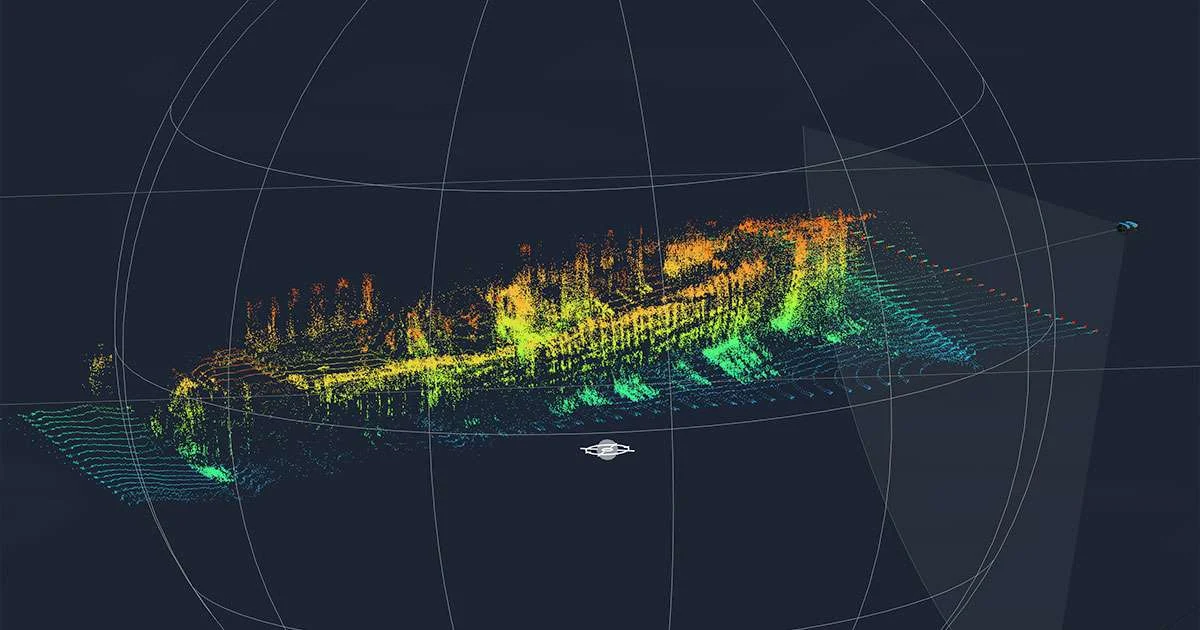
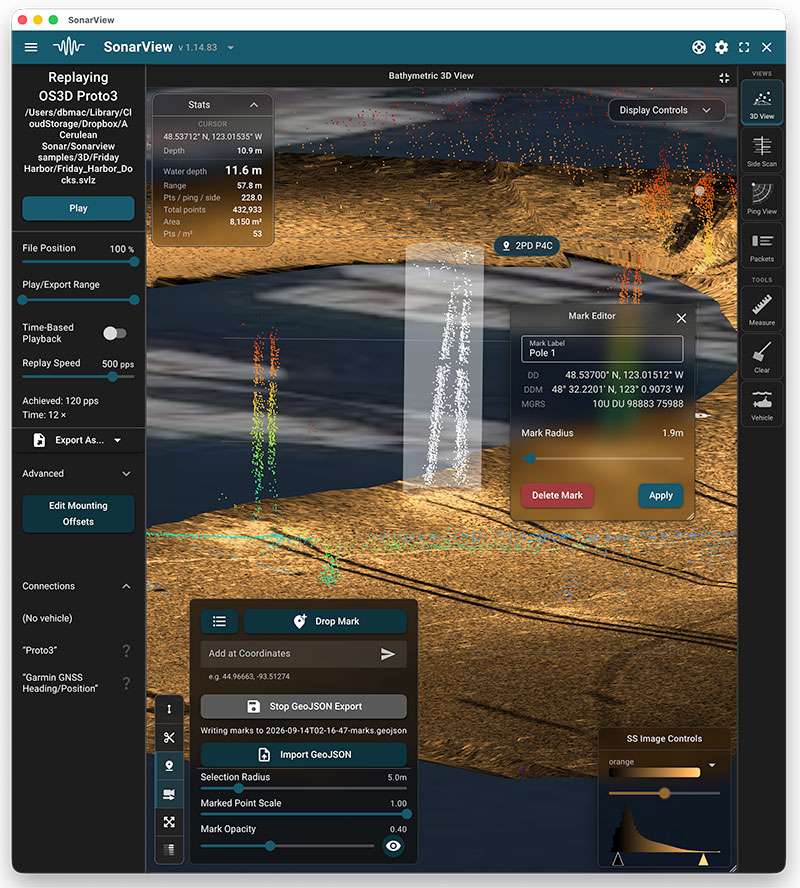
When paired with Omniscan 3D, SonarView helps answer those questions by creating an immersive 3D environment. An operator can identify objects of interest in real time, selecting, categorizing, and logging them with exact location coordinates. Target areas can be selected, and distances can be measured between objects to create a detailed understanding of the environment. This data is saved and can be exported for analysis and further inform next steps in the evolution of a project.
Realizing Operator Efficiency
Users are finding efficiency gains and reduced time in decision making. For example, a surveyor can review bottom profiles and depth changes. An inspection team can document a feature rather than relying on a screenshot and handwritten note. A search crew can record where a possible target was found before moving the vehicle. Saved observations give the next operator a starting point for follow-up inspection, recovery or survey work.
SonarView also keeps the data useful after recovery. Operators can record a live session and reopen it later; the data is exportable for post processing in a variety of common file formats. Compressed log files help reduce storage needs during longer projects, while batch export supports collections from multiple runs.
Keeping SonarView user-friendly required more than adapting its interface to different operating systems. Cerulean Sonar separated the application into two cooperating parts: SonarView provides the operator’s controls, displays and data processing, while SonarLink handles communication with the hardware—keeping the tech-stack light. For customers, that means users have a low barrier to entry in understanding the software and maximizing the capabilities quickly; and they have the flexibility to use the software on nearly any hardware architecture.
Device-Specific Modules
Different instruments still require different controls. A multibeam echosounder, imaging sonar, or an underwater positioning system do not present the same data in the same format. SonarView manages these differences through device-specific modules while keeping common tasks such as discovery, connection, configuration, recording, and replay familiar.
A key value of this is the reduction in time to learn and master the software functionality. For an operator this shortens the time between seeing something below the surface and understanding what to do next. In supported workflows, observations can be measured, documented, shared and revisited instead of becoming isolated images on a screen.
When visibility ends at the camera lens, SonarView helps teams turn subsea data into findings they can trust and decisions they can act on with confidence and efficiency.